

Manage Forms
Find, organize, and reopen forms from the Forms workspace
The Forms workspace is the central place to create, find, and organize feedback forms in a project.
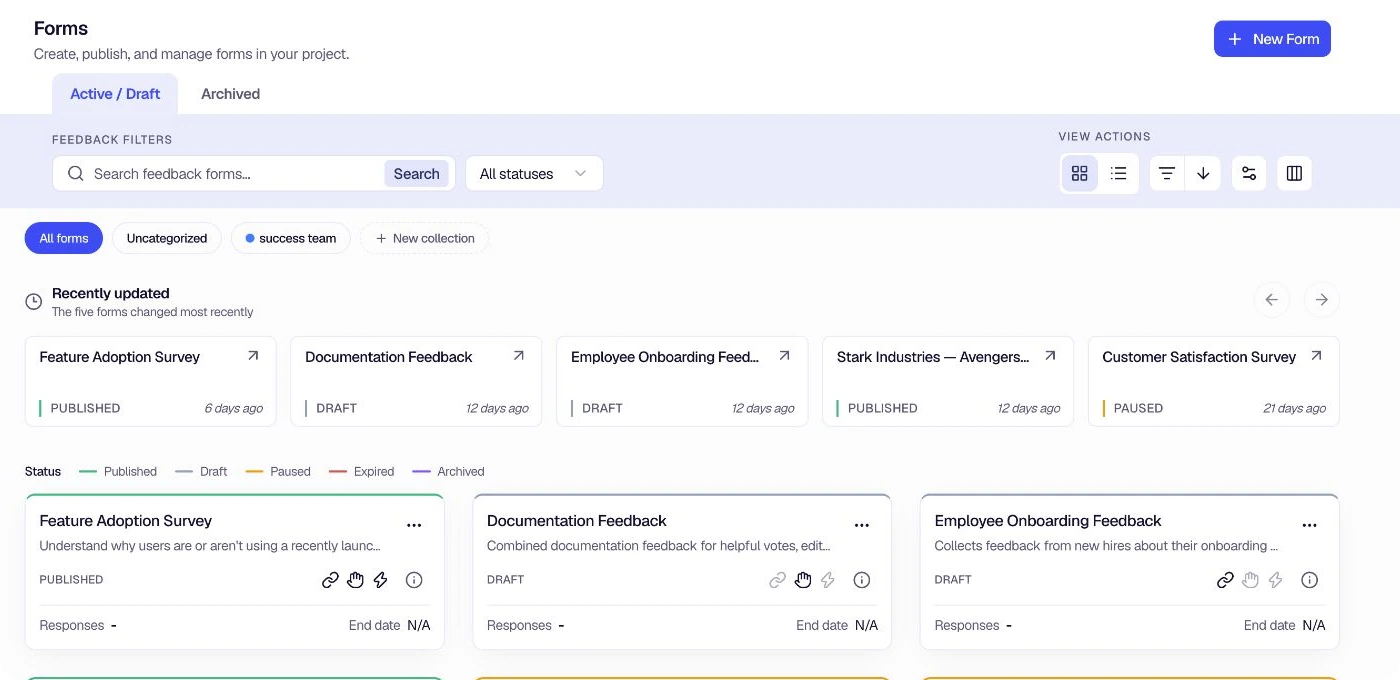
Find a form
- Use Active / Draft and Archived to switch between current and archived forms.
- Search by form name or description and narrow the result by status.
- Switch between the grid and list views.
- Change the sort order or choose which columns appear in the list view.
The Recently updated row keeps the five forms changed most recently within reach. Select a card to reopen that form.
Organize forms with collections
Collections are project-level groups. A form can belong to one collection, and forms without a collection remain available under Uncategorized.
Use the collection pills above the results to filter the workspace. Select New collection to create a group. To rename, reorder, delete, or manage the forms inside a collection, open Settings → Form Collections.
Collections organize the workspace without changing a form's publishing status, targeting, or responses.
Create a form
Select New Form to start with a proven template, Encatch AI, or a blank form.
Was this page helpful?